EVA — Universal Safety App
EVA — Universal Safety App

EVA —“An AI-powered emergency protection system designed to react even
when the user cannot.”Universal Safety App
EVA is a proactive AI-driven safety application that combines emergency
automation, voice interaction, fall detection, and intelligent emergency
workflows to reduce response time during dangerous situations.
Project Details
Project Details
Category Details
Category Details
Role UI/UX Designer
Role UI/UX Designer
Timeline 6 Weeks
Timeline 6 Weeks
Platform Mobile App
Platform Mobile App
Industry Safety Technology
Industry Safety Technology
Tools Figma, Illustrator
Tools Figma, Illustrator
Focus Areas Emergency UX,
AI Interaction, Accessibility
PROJECT OVERVIEW
PROJECT OVERVIEW
Traditional safety applications are mostly reactive systems that depend entirely on manual
user interaction during emergencies.
However, real-life emergencies are unpredictable. Users may panic, become unconscious, lose phone
access, or fail to trigger emergency actions in time.
EVA was designed to solve this problem through proactive AI-powered emergency assistance.
The application continuously monitors emergency situations, verifies user safety through AI voice
interaction, and automatically triggers emergency workflows when needed.
Vision Statement
“Safety systems should not wait for user interaction during emergencies.”
EVA is a proactive AI-driven safety application that
combines emergencyautomation, voice interaction,
fall detection, and intelligent emergency workflows
to reduce response time during dangerous situations.
EVA —“An AI-powered emergency protection system
designed to react even when the user cannot.
”Universal Safety App
THE PROBLEM
THE PROBLEM
Emergency Systems Fail During Real Emergencies Most safety apps assume users can: unlock their
phones, open the app,navigate the interface, and manually activate SOS.
But in reality:
Panic reduces reaction ability,
Physical injuries prevent interaction,
and unconscious users cannot trigger emergency support.
This creates a dangerous gap between:
Danger detection and emergency response.
RESEARCH
RESEARCH
Understanding Emergency Behavior
The research phase focused on understanding: user behavior during
panic situations, emergency interaction limitations, and weaknesses in existing safety systems.
Research
Methods
User Interviews
Understand safety concerns
Competitor Analysis
Identify product gaps
Behavioral Research
Study panic response
Scenario Mapping
Analyze real emergency situations
User Interview Insights
Women Users
Users expressed fear during:
isolated travel,
nighttime commuting,
and unsafe environments.
Elderly Users
Main concerns included:
accidental falls,
delayed assistance,
and inability to contact family quickly.
Solo Travelers
Users worried about:
unfamiliar environments,
emergency accessibility,
and location sharing.
Methods
Research
User Interviews
Understand safety concerns
Competitor Analysis
Identify product gaps
Behavioral Research
Study panic response
Scenario Mapping
Analyze real emergency situations
User Interview Insights
Women Users
Users expressed fear during:
isolated travel,
nighttime commuting,
and unsafe environments.
Elderly Users
Main concerns included:
accidental falls,
delayed assistance,
and inability to contact family quickly.
Solo Travelers
Users worried about:
unfamiliar environments,
emergency accessibility,
and location sharing.
Focus Areas Emergency UX,
AI Interaction, Accessibility
Understanding Emergency Behavior
The research phase focused on understanding: user behavior during
panic situations, emergency interaction limitations, and weaknesses in existing safety systems.
Key Research Insight
“Users cannot rely on complex interaction during emergencies.”
Key Research Insight
“Users cannot rely on complex interaction during emergencies.”
Scenario 01 — Night Safety
A woman traveling alone at night senses danger nearby.
She feels unsafe but cannot openly use her phone without attracting attention.
EVA silently monitors the situation and allows emergency activation through quick gestures or voice interaction.
Scenario 02 — Elderly Fall Detection
An elderly user slips in the bathroom and becomes unconscious.
Traditional apps fail because manual interaction is impossible.
EVA detects the fall, asks for voice confirmation, and automatically alerts emergency contacts
when no response is received.
Scenario 03 — Road Accident
A bike rider crashes on an isolated road.
The phone remains nearby but no emergency action is triggered manually.
EVA detects abnormal impact and inactivity, then activates emergency response protocols automatically.
REAL-LIFE SCENARIOS
COMPETITOR ANALYSIS
REAL-LIFE SCENARIOS
Existing Solutions Reviewed
Life360
Noonlight
bSafe

COMPETITOR ANALYSIS
Existing Solutions Reviewed
Life360
Noonlight
bSafe
Gap Opportunity
Gap Opportunity
Current solutions are:
reactive,
manual,
and interaction dependent.
This revealed an opportunity for:
proactive AI-powered safety systems.
Current solutions are:
reactive,
manual,
and interaction dependent.
This revealed an opportunity for:
proactive AI-powered safety systems.
DESIGN OPPORTUNITY
SOLUTION
DESIGN OPPORTUNITY
The main UX opportunity identified was:
“Can a safety app intelligently react before the user manually asks for help?”
This led to the development of:
automated emergency workflows,
AI safety verification,
and intelligent detection systems.
Introducing EVA
EVA is designed as:
“An intelligent emergency companion.”
The system continuously:
monitors activity,
identifies dangerous situations,
verifies user safety,
and activates emergency workflows automatically.
Solution
Core Features
AI Voice Verification
EVA asks:
“Are you okay?”
If no response is detected:
emergency alerts are triggered automatically.
Yaha pe illustration stody dikhaunga suddenly hear beat fast ho
gai usne watch pehni hai, or msg pop up hoga, and emergency wale ko
bhi notification jaayega ki
papa ki heartbeat fast ho rhi h
Smart Fall Detection
The system identifies:
abnormal impacts,
sudden falls,
and inactivity patterns.
ek image add hogi
ek image add hogi
Real-Time Tracking
Emergency contacts receive:
live location,
movement tracking,
and emergency status updates.
Real-Time Tracking
Emergency contacts receive:
live location,
movement tracking,
and emergency status updates.
Intelligent Delay System
Users receive a short response window before alerts are triggered
to reduce false alarms.
One-Tap SOS
Manual emergency activation remains available for instant support.
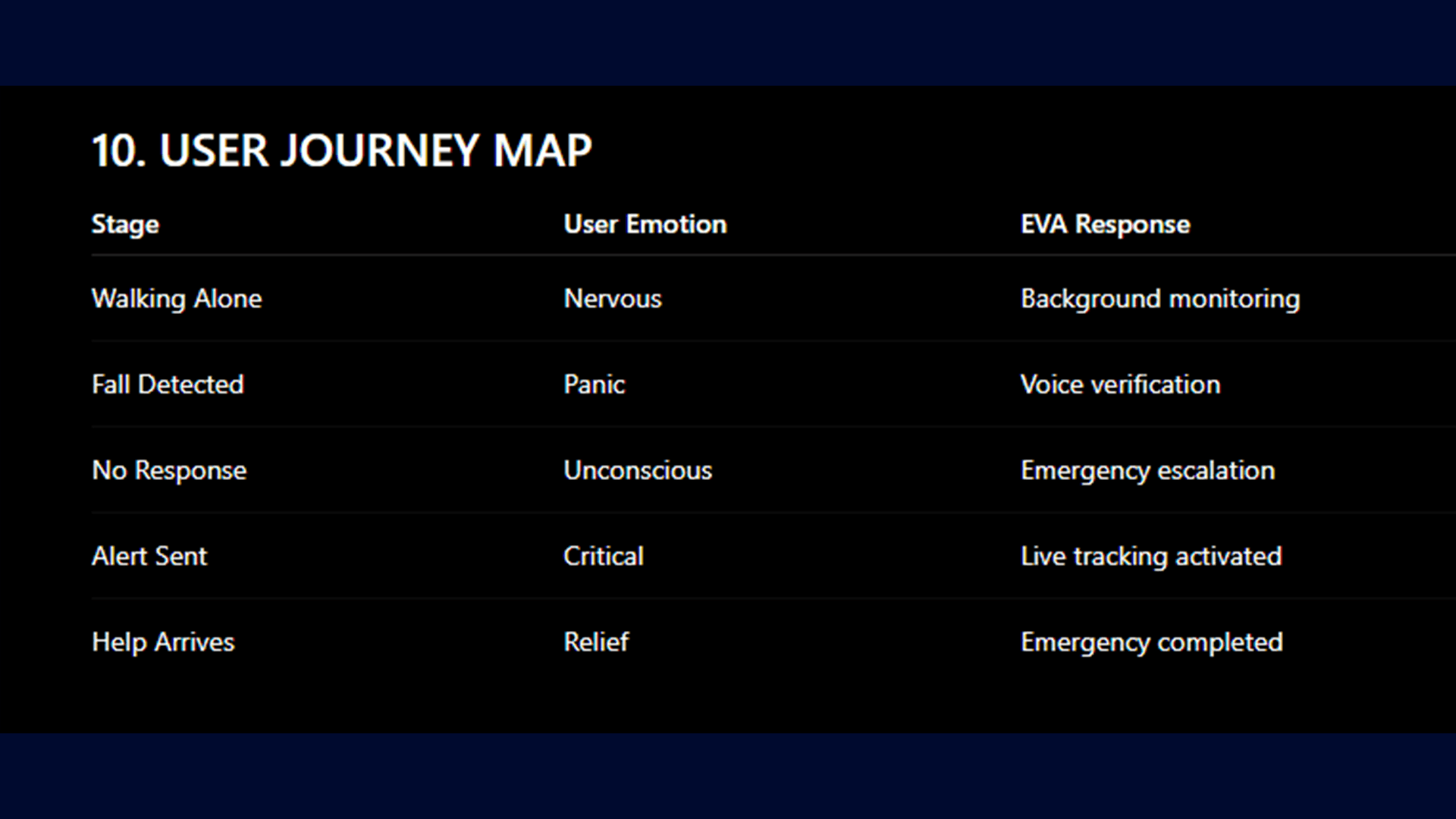
userflow
Userflow
Launch App
↓
Background Monitoring
↓
Abnormal Activity Detected
↓
AI Voice Verification
↓
Did User Respond?
↓
Yes → Cancel Emergency
No → Trigger Emergency Workflow
↓
Send Live Location + Alerts
INFORMATION ARCHITECTURE
INFORMATION ARCHITECTURE
Home
├── Emergency SOS
├── Live Tracking
├── AI Assistant
├── Emergency Contacts
├── Safety History
├── Notifications
└── Settings
Home
├── Emergency SOS
├── Live Tracking
├── AI Assistant
├── Emergency Contacts
├── Safety History
├── Notifications
└── Settings
DESIGN SYSTEM
Visual Direction
The visual identity focuses on:
trust,
calmness,
futuristic AI interaction,
and emergency clarity.
Color Palette
Color Purpose
Deep Navy Safety foundation
Emergency Red Critical alerts
AI Blue Smart interaction
Soft White Readability
Typography
A clean and modern typography system was used to:
improve readability,
reduce stress during emergencies,
and maintain visual clarity.
UI Principles
Minimal Cognitive Load
Interfaces are simplified for stressful situations.
High Accessibility
Large touch areas and strong contrast improve usability.
Calm Emergency Experience
The UI avoids panic-heavy visuals.
FINAL UI EXPERIENCE
FINAL UI EXPERIENCE
The final interface was designed to feel:
intelligent,
emotionally reassuring,
minimal,
and highly responsive.
The system balances:
emergency urgency,
with calm user guidance.
ACCESSIBILITY
Accessibility was prioritized to support users during:
panic,
stress,
physical injury,
and low visibility conditions.
Accessibility Features
Voice interaction
Large touch targets
High contrast UI
Simplified emergency flows
Low cognitive load layouts
ACCESSIBILITY
Accessibility Features
FINAL OUTCOME
EVA transforms emergency systems from:
reactive safety tools
to
proactive intelligent protection systems.
The project demonstrates how AI-driven UX can:
reduce emergency response time,
improve accessibility,
and create safer digital experiences.
17. REFLECTION
This project helped explore:
emergency-centered UX,
AI interaction design,
accessibility systems,
emotional design,
and proactive safety experiences.
The biggest learning was understanding how UX can directly impact human safety during critical moments.
FINAL STATEMENT
EVA is not just a safety app.
It is a vision for the future of intelligent emergency protection.

